Appearance
What the platform does
Ranchao runs the operational side of a small rental or tour business: what you own, who booked it, who is doing the work today, and how you get paid. One account is one shop. Everyone in your shop logs into the same account with their own user.
This page is the map. The other pages are the walkthroughs.
Pick what you run
At sign-up you choose one of three verticals, and that choice decides which menu items exist for you:
| You run | You get | Your daily object |
|---|---|---|
| Vehicle rental | Fleet, Partners, Maintenance, Expenses, Owners, Settlements | A booking against a scooter or car |
| Property rental | Properties, Owners, Settlements | A booking against a villa, apartment or room |
| Trips & tours | Trips (a per-day passenger manifest), Fleet & Destinations, Trips & pricing | A trip day, with people assigned to boats or vans |
You are not locked in. Settings → Plan & billing → What you run lets you switch a vertical on or off later. Trips requires the Business plan; the two rental verticals are on every plan.
Everyone, on every vertical, also gets: Dashboard, Tasks, Bookings, Customers, Users, Reports and Settings.
If you run trips or properties, the Dashboard and Reports follow your vertical, including the revenue breakdown: which villas earn, which trips earn. Trips are broken down by destination, not by boat, because what you sell is "Ko Tao", not "boat number three". Run more than one vertical and you get one breakdown per vertical, side by side.
Who can see what
There are five roles. An owner can invite any of them, including another owner; a manager can invite agents and employees only.
| Role | What they see |
|---|---|
| Owner | Everything, including Settings, Outreach and Lead-gen |
| Manager | Everything operational. No Settings, no Outreach, no Lead-gen |
| Agent | Dashboard, Tasks, Trips, Inbox, Bookings, Customers. Their own bookings only |
| Employee | Dashboard and Tasks only |
| Vehicle Owner | Dashboard and Reports only |
The practical split: an Owner configures the shop, a Manager runs it, an Agent sells, an Employee does the jobs on the ground.
Only the Owner can open Settings. If a manager says "I can't find where to change the payment details", that is why, and it is deliberate.
On a phone
Most of the day happens on a phone, so the layout changes below 768px wide.
Bottom bar: Tasks, then Inbox / Outreach / Shop if you have them, then a Rentals button, then More.
- Rentals opens a grid with Bookings, Trips, Vehicles, Owners, Partners, Settlements, Properties, Customers.
- More holds Dashboard, Crypto Payments, Users, Reports, Settings, the language switch and your account.
Three things worth knowing before you plan someone's day around a phone:
- Dashboard is not a tab. It is inside More.
- Maintenance and Expenses have no phone entry point at all. They exist only under the desktop Vehicles menu. On a phone you would have to type the address.
- Card payment links can only be created on desktop. The panel is not on the mobile booking page.
The guided setup tour also only starts by itself on desktop. On a phone, start it from the "Get started" card on the Dashboard.
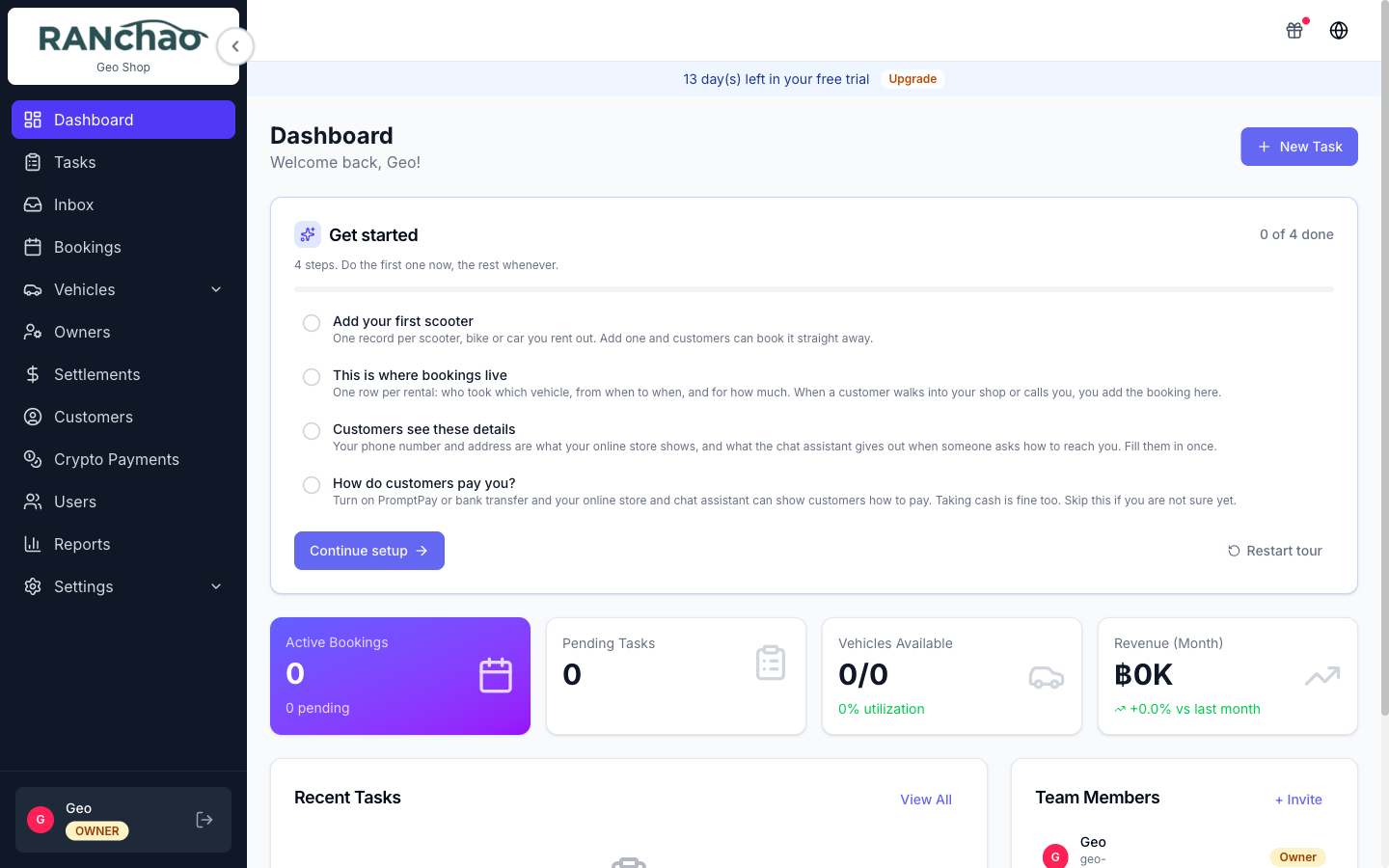
The four numbers on the Dashboard
| Tile | What it counts |
|---|---|
| Active Bookings | Bookings that are Confirmed or In progress. The smaller line counts Pending |
| Pending Tasks | Tasks that are To do or In progress. "Overdue" is that same set past its due date |
| Vehicles available / Properties available / Trips today | Whichever fits what you run. Vehicles and properties show available out of total; trips shows today's departures and how many people are going |
| Revenue (Month) | The total of bookings marked Completed whose record was last touched this month |
Two things to know. The revenue figure counts a booking on the date its record was last edited, not the date money arrived, so treat it as a rough indicator rather than an accounting figure. And these numbers are not filtered by role: everyone who can open the Dashboard sees shop-wide totals.
Add-ons
The core product is the fleet, bookings, tasks and customers. Everything below is bought separately, at Settings → Plan & billing → Add-ons.
| Add-on | ฿/month | What it gives you | How to get it |
|---|---|---|---|
| Omnichannel inbox | 990 | One inbox for WhatsApp, Telegram, Facebook, Instagram and email | Buy it yourself |
| AI Assistant | 590 | A bot that answers customer questions from your own knowledge base | Buy it yourself, Business plan |
| AI booking bot | 790 | Extends the assistant so it can quote and take orders | Buy it yourself, Business plan |
| AI co-pilot | 890 | Commands your staff type while handling a chat | Buy it yourself, Business plan |
| Crypto payments | 99 | Accept USDT on TRON | Buy it yourself |
| Viator & TripAdvisor | 1,490 | Sell your trips through Viator | Buy it yourself |
| Outreach campaigns | 490 | Cold outreach over your connected channels | Ask us to switch it on |
| Lead-gen monitor | 990 | Watch Telegram chats for buying intent | Ask us to switch it on |
Two things decide whether an add-on will actually do anything for you.
None of the AI add-ons run without the Omnichannel inbox. The assistant, the booking bot and the co-pilot all read and write through the inbox, so if the inbox is off they are switched off with it regardless of what you have paid for. The Integrations page says so in an amber notice if you get there first.
Outreach and Lead-gen are not in the self-serve list. They are switched on for you on request, because both send messages from your own accounts and both need a short conversation about how to do that without getting a number banned.
On a free trial the inbox, the AI assistant, the booking bot, the co-pilot and crypto are switched on automatically so you can try them. Outreach, lead-gen and Viator are never auto-granted.